What can I do in the new IRS app after IR-2026-114?
For more than a decade the mobile face of the IRS was IRS2Go: a refund tracker and a link to free-file. It was useful, but it did almost nothing that touched your actual account. That changed on September 25, 2026. In press release IR-2026-114 the agency announced that IRS2Go was being replaced by a new IRS app that ties into the Individual Online Account and puts a real slice of account-level self-service on your phone. This post walks through what the app actually does, how it fits alongside IRS.gov, what business owners and tax pros still need to do on the desktop, and how to avoid the look-alike apps that are already circling this rollout.
What is the new IRS app and what happened to IRS2Go? 📱
The IRS app is a rebuilt mobile experience that replaces IRS2Go. It keeps the old refund tracker and adds secure, account-level access to selected Individual Online Account services on iOS and Android.
According to the IRS Newsroom (IR-2026-114, Sept. 25, 2026), the change is meant to move the agency’s digital-first strategy off the desktop and onto the phone that most taxpayers already use for everything else. The IRS calls it a step, not a destination — the release explicitly says the app will keep gaining capabilities over time — but the launch itself is a real functional jump, not just a rename.
Two facts about the transition are worth knowing before you touch your phone. First, existing IRS2Go users do not need to download a separate app; the store update path carries them onto the new install. Second, the app does not stand alone. Sign-in uses the same identity verification the IRS uses on the web, so the practical prerequisite for getting value out of the app is having a working Individual Online Account on IRS.gov.
What can I do in the new IRS app on day one? ✅
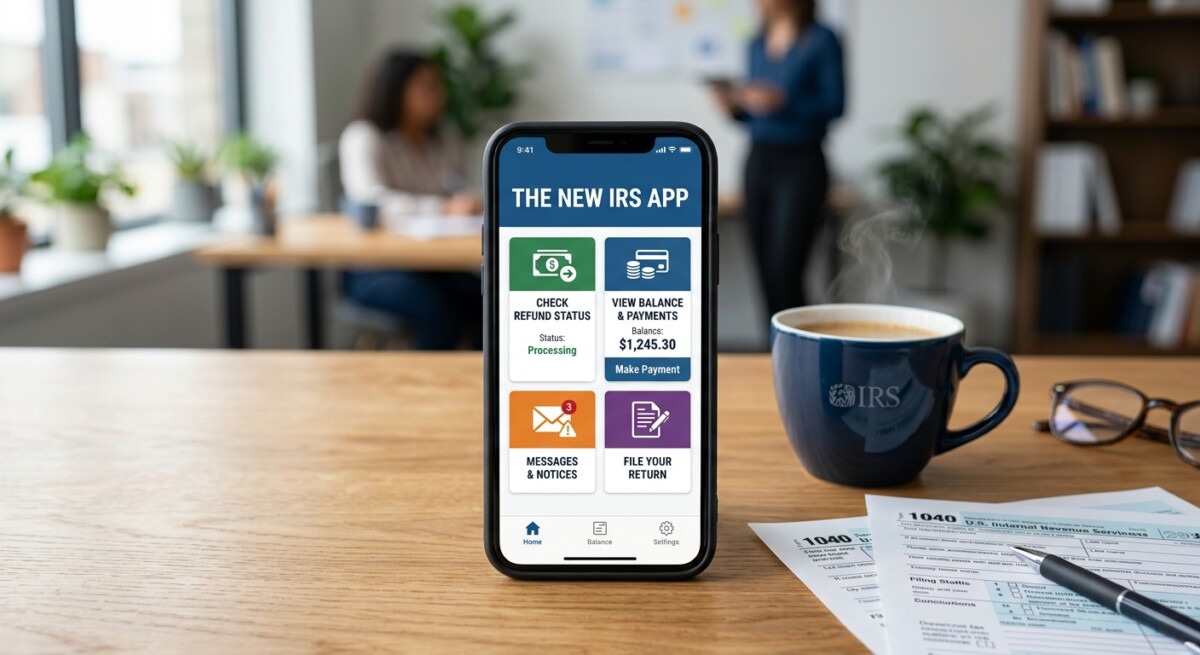
Sign in with your existing IRS.gov credentials to check refunds, view balances, make and review payments, read select notices, pull transcripts, adjust some communication preferences, and access your Identity Protection PIN — all on mobile.
The launch feature list is short by design, but each item removes a friction point that used to force a desktop trip. The full initial capability set the IRS published is:
- Refund and amended-return status. The old Where’s My Refund? and Where’s My Amended Return? lookups, now behind an authenticated session so you see your specific record, not just a public tracker.
- Balance information. View available balance detail from your Individual Online Account without opening a laptop.
- Payments and payment activity. Make a payment and review recent payment activity from the same session.
- Select notices and letters. Read the notices the IRS has already made available electronically in your account — helpful when a paper letter arrives and you want to confirm it against the record.
- Tax records and transcripts. Pull available tax records and transcripts, which used to require a desktop browser to render cleanly.
- Profile and communication preferences. Manage a subset of profile and communication settings from the app.
- Identity Protection PIN. Access your IP PIN through the app if you are enrolled in the IRS Identity Protection PIN program.
The IRS is careful about the boundary. Not every Online Account feature is on mobile yet — the release says the app extends selected features — so if a specific workflow is missing from the app in your first session, that is expected and the desktop version of your account is the fallback.
How does the IRS app compare with IRS.gov and Online Account? 🌐
The IRS app is a convenience layer over the Individual Online Account on IRS.gov. The desktop site still holds the full account, forms, publications, business accounts, and tax-pro tools; the app is a curated set of common self-service actions.
Here is the practical division of labor between the three surfaces as of launch:
| Surface | What it is best for | What it does not do (yet) |
|---|---|---|
| IRS app (mobile) | Quick, authenticated actions from a phone: refund status, balance, payment, IP PIN, recent notices. | Full Online Account, business or tax-pro workflows, forms library, publications. |
| Individual Online Account on IRS.gov | The full account experience — every category of notice, complete records and transcripts, all payment options, authorizations. | Business-entity or tax-pro-side workflows; those are separate accounts. |
| IRS.gov (public) | Forms, instructions, publications, interactive tools, guidance, and news that does not require sign-in. | Anything account-specific — you still have to sign in. |
If you are already comfortable in your Online Account, the app is a straight upgrade for the common tasks — the ones that used to send you looking for a laptop when a client email came in on a Sunday. If you have never used Online Account, the sequence matters: set it up and finish identity verification on IRS.gov first, then the app becomes a one-tap sign-in on the same credentials.
From our practice: mobile makes IP PIN adoption easier
In our practice, the single feature most likely to change client behavior is IP PIN access. Every filing season we spend hours helping clients retrieve or reset an IP PIN because they only think about it in April, from a phone, on the road. Having secure, authenticated access to the number on the same device the client uses to check email is the kind of small change that quietly cuts identity-theft filings — the reason the program exists in the first place. If you have not enrolled in the IP PIN program, the app is a reasonable prompt to do it before next filing season.
What about business owners, tax pros, and Business Tax Account? 💼
The initial IRS app release covers Individual Online Account features only. Business Tax Account and Tax Pro Account remain on IRS.gov, and the IRS says future capability additions are coming to the app.
For entity-level filings, payments, notices, and authorizations, the Business Tax Account on IRS.gov is still the destination for owners, partners, and officers. For tax professionals, the Tax Pro Account is still where authorizations, Centralized Authorization File requests, and client access live. Nothing about the app changes those workflows. What it does change is the amount of time a small-business owner personally spends in a browser tab just to answer the question, “did my payment go through and did any notices hit my account?” — that answer is now on the phone.
The app is not for filing your return
The IRS app is not a filing app and does not replace software or a preparer. It connects to your account so you can see records, payments, and notices — not so you can e-file a Form 1040. The IRS release is careful to note that IRS.gov, phone assistance, and in-person help — see IRS telephone and in-person help — remain available for anything the app does not cover or that needs individualized help.
How do I avoid fake IRS apps and IRS-app scams? 🚨
Download the IRS app only through the verified store links on irs.gov/help/app, and treat any unsolicited message that asks for account credentials as a scam. The IRS will not ask for sensitive information through unsolicited text, email, or pop-ups.
Every high-profile IRS product launch is followed by a wave of look-alike apps and phishing campaigns that piggyback on the announcement. The IRS release names this risk directly and gives one clean rule: start at IRS App page on IRS.gov, then use the verified links from that page to reach the real listings in the Apple App Store and Google Play. Do not download an “IRS” app from a search-ad, a text link, or a QR code you received from an unknown source.
- Start on IRS.gov, not in the store. The IRS page at irs.gov/help/app is the anchor. From there you follow the official listing links to the store — never the other way around.
- Check the publisher. On the App Store and Google Play, verify the publisher name is Internal Revenue Service. A logo alone is not enough — impostor apps reuse IRS artwork.
- Ignore paid “account access” pitches. The IRS app is free. Any app that charges for access to your own IRS account is not legitimate.
- Do not sign in from an unsolicited link. Real IRS-initiated communication does not push you to sign in through a text link, email link, or pop-up. See the running list of active schemes on IRS tax-scams and consumer alerts.
- Report look-alikes. If you find an impostor app or receive a scam message, report it through the store’s reporting tools and to the IRS at phishing@irs.gov.
Summary: the new IRS app in one page
- IR-2026-114 (Sept. 25, 2026) retires IRS2Go and launches the new IRS app on iOS and Android.
- The app connects to selected Individual Online Account features: refunds, balance, payments, notices, transcripts, profile settings, and Identity Protection PIN access.
- Existing IRS2Go users are auto-upgraded through the store; no separate download.
- The app does not replace IRS.gov, the Business Tax Account, or the Tax Pro Account.
- Download only from the verified store links on irs.gov/help/app — expect look-alike apps.
Frequently asked questions about the new IRS app ❓
Q. Do I need to download a new IRS app if I already had IRS2Go?
No. The IRS says current IRS2Go users do not need to download anything new. If you have automatic updates enabled on the App Store or Google Play, IRS2Go will update to the new IRS app through the normal update process. If you turned automatic updates off, open the store, search for the IRS app, and accept the update on the same install.
Q. What can I actually do in the new IRS app that I could not do in IRS2Go?
IRS2Go was mostly a refund tracker and a link to free-file resources. The new IRS app adds a secure sign-in that connects to selected features of your Individual Online Account: refund and amended-return status, available balance, payments and payment activity, select notices and letters, tax records and transcripts, some profile and communication preferences, and access to your Identity Protection PIN. Sign-in uses the same identity-verification process as IRS.gov.
Q. Does the IRS app replace my Online Account on IRS.gov?
No. The IRS is explicit that the app extends selected Individual Online Account features to mobile; it does not replace IRS.gov, your full Online Account, or the Business Tax Account and Tax Pro Account. If you need the full range of account features, forms, publications, or account services for a business or client, IRS.gov is still the primary destination.
Q. Is the IRS app free, and how do I make sure I am downloading the real one?
The IRS app is free through the Apple App Store and Google Play. To avoid look-alike apps and paid impostors, start from irs.gov/help/app and follow the verified store links from that page. The IRS will not ask you for sensitive personal or financial information through an unsolicited text, email, or pop-up, and no legitimate app requires you to pay to view your own IRS account.
Q. Can businesses or tax pros use the new IRS app for client work?
Not yet. The initial release extends selected Individual Online Account features only. Business owners still use the Business Tax Account on IRS.gov for entity-level payments, notices, and authorizations, and tax professionals use the Tax Pro Account for authorization workflows and Centralized Authorization File requests. Watch the IRS Newsroom for future capability additions to the app.
Q. What should I do first if I have never used my IRS Online Account before?
Start on IRS.gov, sign in or create an Individual Online Account, and complete identity verification there. Once your account works on the desktop, the same credentials sign you in on the app. Doing verification on a full browser first is the least painful path — mobile keyboards and camera prompts make the identity-verification step slower on a phone.
This article summarizes a public IRS announcement and is general information, not tax or legal advice for your situation. If you have questions about how to set up or verify your Individual Online Account, or about the IP PIN program, SW Accounting & Consulting Corp is available for a confidential consultation.